English
 Deutsch
 Español
 Français
 Italiano
 日本語
日本語 Русский
 中文
中文
How to Print PET-CF: A Comprehensive Guide
- Published November 06 2025 - Updated September 19 2026
Mastering the Art of Carbon Fiber-Reinforced PET Printing with Temperature-Optimized Hardware and Drying Protocols.
3D printing with PET-CF (Polyethylene Terephthalate Carbon Fiber) can be an awesome addition to any project, it’s extremely strong and stiff, plus it’s got excellent thermal resistance. So, the first thing to know about working with PET-CF is that there are lots of special factors that must be considered. Here’s a guide to how you can master the art of 3D printing with PET-CF.
1. WHAT IS PET-CF?
PET-CF or Carbon Fiber Reinforced PET is a composite material made from carbon fibers and PET (Polyethylene Terephthalate) filament. As a reinforced material, it is stronger and stiffer than standard PET materials, with a tensile strength of 78Mpa.
• Stronger and stiffer than standard PET, it has a tensile strength of 78Mpa.
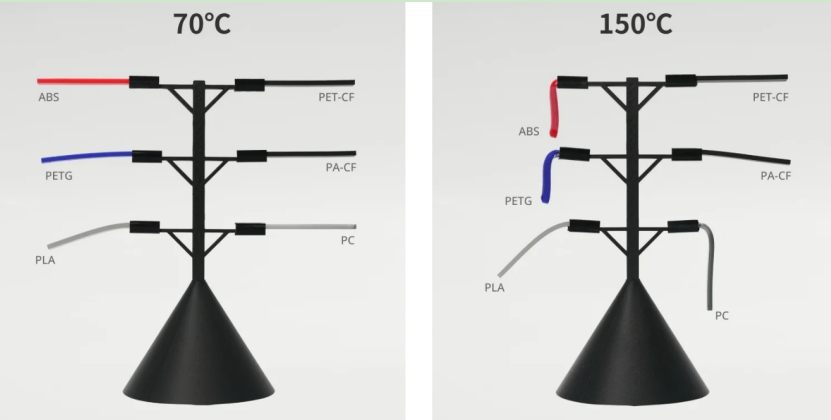
• Heat resistant 150℃, positioning it as ideal for high-temperature applications.
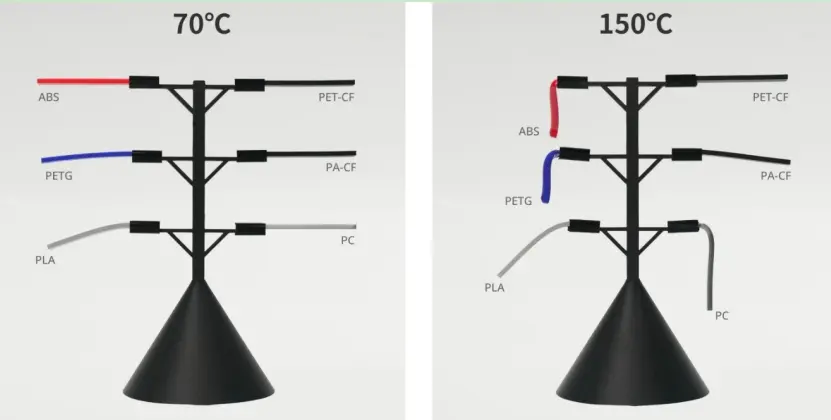
• Specimen size (L*W*H): 95*10*4 mm³
Test conditions: The samples were put in an oven at 70 °C and 150 °C respectively for 0.5 hour.
• As a crystalline material, PLA will significantly deform only after the temperature exceeds its melting point (around 155°C).
• Image Source: Bambulab
• Lightweight, with improved structural integrity due to the carbon fibers.
2. HOW TO PREPARE YOUR 3D PRINTER FOR PET-CF?
Printer Compatibility:
• Hardened steel nozzle: The carbon fibers in the PET-CF are very abrasive and can soon wear out a brass nozzle. Only a hardened steel nozzle is suitable here.
• A heated bed is essential, ideally one that can reach temperatures up to 110°C.
Nozzle Size:
• Use a 0.6mm or larger nozzle to prevent clogging with small fragments of carbon fibers that are part of the PET-CF material.
Extruder Type:
• A Direct Drive Extruder is preferred over Bowden style filament guide for increased control of the filament.
3. PRINTING SETTINGS
Temperature:
• Extruder Temperature: Set between 240°C and 260°C. Start at a lower temperature and gradually increase if the filament does not extrude smoothly.
• Bed Temperature: Set between 100°C and 110°C. This temperature should be set with the use of a bed adhesive such as PEI, Kapton tape or PVA glue.
Print Speed:
• Print at a moderate speed, around 60-90 mm/s. PET-CF requires slower speeds for better layer adhesion and surface finish.
Layer Height:
• A layer height of 0.25mm is ideal for balancing detail and strength.
Cooling:
• Part cooling fans are enabled but set to a low power level (around 20-30%) in order to prevent warping of the print.
4. PREPARING THE FILAMENT
Dry the Filament:
• PET-CF is hygroscopic and so soaks up moisture from the air. Drying the filament before use in a filament dryer at 70°C for 4-6 hours is recommended.
Storage:
• PET-CF can be stored in sealed containers with desiccant packets when not in use.
5. PRINTING TIPS
• First Layer: First Layer adhesion must be good. Adjust bed leveling and Z-offset as required to achieve suitable adhesion.
• Adhesion: Use a wider brim( double layers if possible) or raft to improve bed adhesion and prevent warping, especially for larger prints.
• Support Structures: Support structures for prints using PET-CF can be difficult to remove from the printed part. This can be minimized by designing supports to be as minimalist as possible. An alternative method for prints that are to be dual extrusion printed with a soluble support material (PVA) is to have the first extruder deposit the soluble support material while the second extruder creates the majority of the part.
• Post-Processing: PET-CF parts can be sanded or machined for a smooth surface. Be careful when sanding or machining parts printed with PET-CF because of the risk of fine dust becoming airborne, and not being good for your health.
6. TROUBLESHOOTING COMMON ISSUES
• Nozzle Clogs: If you experience nozzle clogs, increase the print temperature slightly or use a larger nozzle.
• Warping: This can be reduced by making sure the print bed is the correct temperature and is using bed adhesives. An enclosed printer would also help to maintain a constant temperature.
• Stringing: Adjust the retraction of the filament as required. Here increasing the retraction distance and speed in stages can be helpful to prevent too much stringing.
• Layer Delamination: Increase the print temperature, or print slower, to improve layer adhesion.
CONCLUSION
Printing with PET-CF is tough but totally worth it allows for the production of strong, heat-resistant parts. Printing with PET-CF in 3D printing can be challenging but with the proper 3D printing setup, preparation of the filament and knowledge of printing with PET-CF, fantastic parts can be printed. Good luck with printing with PET-CF!