English
 Deutsch
 Español
 Français
 Italiano
 日本語
日本語 Русский
 中文
中文
The Best CAD Software for 3D Printing: A Comprehensive Guide
- Published November 06 2025 - Updated September 19 2026
Choosing the Right CAD Design Software for Precision, Creativity, and 3D Printing Workflows.
In the current state of 3D printing, the selection of the right CAD software for the realization of your 3D printing projects is crucial. Given the large number of programs available for CAD, the selection of the most suitable program for your needs can be a difficult task. This guide aims to present several CAD software programs suitable for additive manufacturing and to give an overview of the features, the benefits and the fields of application.
1. WHY CAD SOFTWARE IS ESSENTIAL FOR 3D PRINTING
This will allow users to design objects in a virtual space before exporting the object to 3D printing. Software of this nature contains features which allow users to design models in extreme detail. It can also be altered to create the perfect model for printing, allowing for greater efficiency, greater accuracy and higher quality prints.
2. TOP CAD SOFTWARE FOR 3D PRINTING
2.1 Fusion 360: The Integrated Cloud Powerhouse
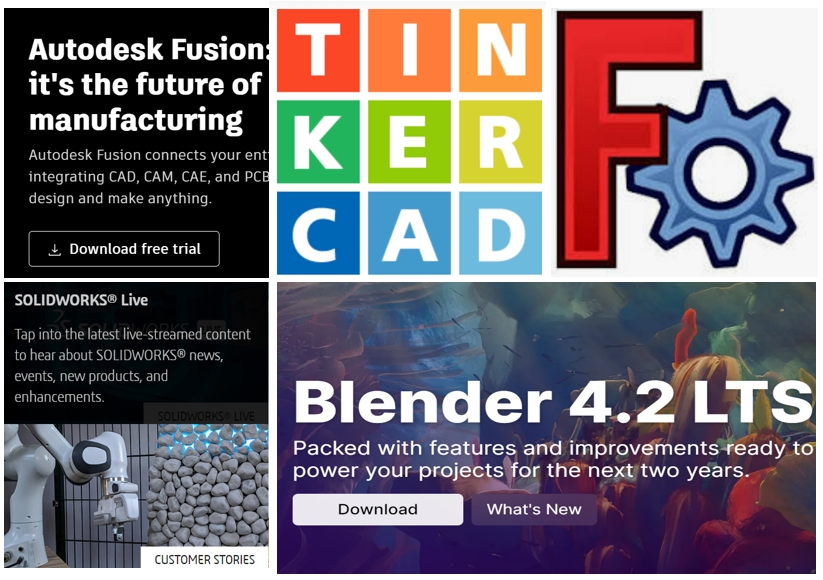
Autodesk Fusion 360 is a powerful cloud-based 3D CAD, CAM and CAE design tool for product design and manufacturing. This software is the perfect solution for makers, hobbyists, and professional designers, engineers and fabricators. It supports collaborative design and development between team members, customers, suppliers, colleagues and partners worldwide.
Fusion 360 has a simple to use interface. It allows for easy updating of designs as they are being changed. This CAD tool is also equipped with a number of different simulations, such as structural analysis, heat transfer, and fluid dynamics. It is easy to test designs for additive printing in a number of different scenarios in order to see whether or not they will work well for printing.
Ideal for makers, hobbyists and engineers, Fusion 360 supports the complete design, engineering and manufacturing workflow, helping users to design, analyze and manage their products more effectively.
2.2 SolidWorks: The Standard for Engineering Precision
SolidWorks is a widely used CAD program. It is parametric CAD software which is mainly used in engineering and in the manufacturing industry. There are a lot of resources available for SolidWorks users such as tutorials, forums, and a big user community.
Complex parts with detailed geometry can be created in SolidWorks. In addition, simulation can be used to test parts in real world scenarios. As SolidWorks is a very popular CAD application, there are many tutorials, online forums, etc. for this product as well as a large amount of third party resources and support from the software vendor itself.
It’s ideal for the engineer/designer that requires high precision and the advanced functionality to complete complex projects.
2.3 Tinkercad: The Perfect Entry Point for Beginners
Tinkercad is an online CAD design software that is really easy to use. It is perfect for beginners of all ages, as well as for teachers and their students to learn about CAD design.
For a large amount of simple models, Tinkercad is ideal. In Tinkercad you can make models without having to learn how to use CAD software. You can then export your models for additive manufacturing. There are many tutorials and example projects to help beginners get started with Tinkercad quickly.
This software is ideally suited for the beginner to 3D design as well as for the educator, and for the hobbyist and maker of all ages and skill levels.
2.4 Blender: Unmatched Versatility for Artistic Modeling
Blender is an open-source program for making three-dimensional, animated photos. The program is very powerful and has complete support for modeling, animation, and rendering.
Blender is particularly suited for the artist, that draws complex designs and detailed sculpts. It supports a wide variety of file types. Not only does it support many of the common 3D file types, but it also supports many of the 3D printing file types. It has an active community and there are many, many tutorials available for Blender as well as many examples of things that can be made with it.
This software is great for artists and designers and is a full 3D modeling, rendering and animation package.
2.5 FreeCAD: The Choice for Open-Source Enthusiasts
FreeCAD: A very powerful CAD application for making mechanical engineering parts and products. The source code is published under the GPL. Therefore, it is possible to download the software for free and also to modify it. As open-source software, FreeCAD also has many add-ons. These are created by users of the software, which makes it very versatile. FreeCAD is a great tool for producing technical drawings, 3D models, and also for modeling complex geometric shapes.
These programs allow for modification of parameters of a model in order to make changes. This also allows for a highly modular program, allowing for user written and third party plugins. This program can read and write many different file types, including open CAD files, such as STEP, IGES, DXF, and more.
FreeCAD is ideal for users that prefer to work with an open-source solution for CAD modeling. In addition to having the ability to import and export various file types, users can use the software’s advanced modeling features.
2.6 Onshape: Real-Time Cloud Collaboration
Online CAD programs like Onshape for collaborative real-time design.
Multiple users can work on the same project, completing their part of the design in the most efficient way possible. All projects are online, so there is no software to download and install. All of a user’s design work can be accessed from anywhere, and all versions of a design can be accessed, with changes to a design tracked for the user.
This software is great for teams and organizations that value collaboration and remote work capabilities.
3. CHOOSING THE RIGHT CAD SOFTWARE
Simple CAD designs like Tinkercad or Fusion 360 projects can be made by beginners. More experienced users will probably prefer to work with CAD software like SolidWorks or Blender. Other tools are meant for more complex designs, for example SolidWorks or FreeCAD projects.
Collaborative and free CAD software. Programs that offer real-time collaboration (e.g. Onshape) and others that are free to use (e.g. Blender, FreeCAD) need to be weighed up against each other in terms of the set budget and required features.
CONCLUSION
With this guide you can now find the right CAD software for your ideas to realize 3D printing objects. Depending on your level of knowledge, your wishes and your needs for your projects, there are plenty of CAD software programs for additive printing. We have shown you how to design 3D printing objects in several steps, in the end we decided on the right CAD software.
Explore More in Our CAD Series:
- The Top 3D Modeling Apps
- FreeCAD vs. Autodesk Fusion®: Which CAD Software Reigns Supreme?
- CREO vs. SolidWorks